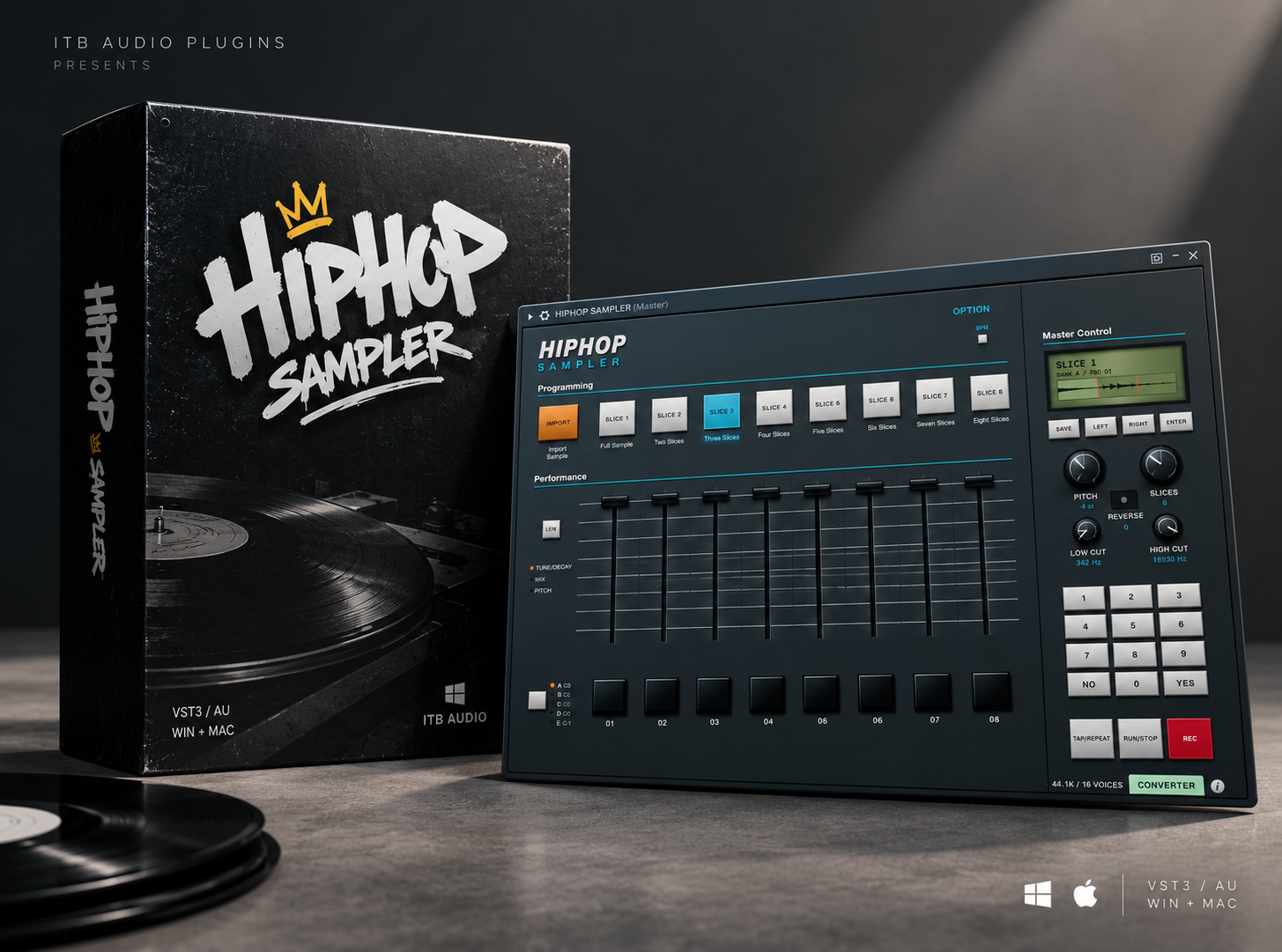
HIPHOP SAMPLER: Bring the SP-1200 Vibe Into Your DAW
A free hip-hop sampler inspired by the legendary E-mu SP-1200. Chop samples, flip loops, shape your sound, and create your own beats.
Hey, Plugheads! What’s good?
I’m happy to announce that HIPHOP SAMPLER is finally ready! Built for beatmakers, producers, and lovers of that raw, old-school hip-hop sound, this plugin brings a classic sampling workflow straight into your DAW.
Inspired by the legendary E-mu SP-1200, one of the most iconic samplers in hip-hop history, HIPHOP SAMPLER is all about creativity, sample manipulation, and the art of flipping sounds into something completely new.
Inspired by the Golden Era of Hip-Hop
The E-mu SP-1200 helped define the sound of classic hip-hop production. Its distinctive character became an essential part of the sonic identity of countless beats, from gritty drum breaks to pitched-down samples and dusty loops.
With HIPHOP SAMPLER, I wanted to bring some of that inspiration into a modern plugin.
I didn’t want to recreate just the look of the original hardware. I also worked on the sound processing, filters, and sample behavior to help capture that vintage, gritty vibe.
Of course, HIPHOP SAMPLER isn’t an exact replica of the original SP-1200. Instead, it’s my own interpretation of that classic sampling experience, designed to fit into today’s digital production workflow.
Load your own samples, experiment with the included sounds, and start creating your own version of that timeless hip-hop flavor.
How to Use HIPHOP SAMPLER
Let’s get into the workflow and see how you can turn your favorite samples into fresh beats.
1. Import Your Samples
Getting started is simple.
You can drag and drop an audio file directly onto the plugin’s display, or click File Import to browse your computer and select the sample you want to use.
Once your audio is loaded, you’re ready to start chopping.
2. Chop Samples and Adjust the Pitch
Use the slice-selection knob to navigate through your sample chops and adjust the pitch to find the sound you’re looking for.
Pitching samples up or down is a classic way to transform the original audio, change its character, and create something that feels completely different from the source.
Experiment with different slices, pitch settings, and combinations until you find your own groove.
3. Play Your Chops Using Your Computer Keyboard
HIPHOP SAMPLER lets you trigger your chops directly from your computer keyboard.
Click inside the plugin window to activate keyboard input, then use the following keys to play the eight pads in Bank A:
A – S – D – F – G – H – J – K
Each key triggers a different pad, making it easy to audition your chops, experiment with different rhythms, and find interesting combinations while building your beat.
4. Drag Your Chopped Samples Into Your DAW
Found a combination you like?
You can drag the rearranged sample directly from the plugin into your DAW.
This gives you the freedom to keep your audio arrangement, edit it further, and reuse it whenever you want. Once the audio is inside your project, you can continue arranging, processing, and mixing it alongside your drums, bass, and other instruments.
5. Shape Your Sound With the Filter
The built-in filter gives you another way to control the character of your samples.
For example, if a sample has too much low-end, you can use the filter to reduce those low frequencies and create more room for your kick and bass.
You can also experiment with filtering to give your chops a darker, thinner, or more focused sound that fits the mood of your beat.
6. Control the Decay
Sometimes a sample needs to be shorter, tighter, or more percussive.
That’s where the Decay control comes in.
Select Decay and adjust the fader to control how long your sample plays. This is useful when you want to tighten up a chop, reduce unwanted tails, or make your samples sit more naturally in your groove.
7. Record Your Performance
Once you’ve found the right combination of chops and settings, you can record your performance directly in HIPHOP SAMPLER.
When you’re finished, drag the recorded audio into your DAW and start arranging, editing, and mixing it however you like.
This workflow is perfect for capturing spontaneous ideas and turning them into audio you can work with throughout your production.
8. Program Your Beats Using MIDI
Prefer a more precise workflow?
You can also recreate your beat directly in your DAW’s piano roll.
Each octave corresponds to a specific bank, allowing you to trigger your chops using MIDI notes and program your patterns directly inside FL Studio.
Instead of playing everything live, you can sequence your samples, adjust the timing, and build your beat step by step.
Whether you prefer performing your chops in real time or programming everything in the piano roll, HIPHOP SAMPLER gives you different ways to approach your sampling workflow.
9. Customize Each Pad
You can also adjust the sound of individual pads within the selected bank.
Click the small controls button to open the pad settings, where you can change:
- Pitch: Tune each pad to fit your beat.
- Volume: Balance the level of individual chops.
- Decay: Control the length of each sample.
For example, you can shorten the decay of Pad 1, lower its volume, or change its pitch without needing to process every chop separately in your DAW.
These individual controls make it easier to build more expressive patterns and give each sample its own character.
Flip Samples. Create Beats. Find Your Sound.
And that’s the idea behind HIPHOP SAMPLER.
Import your audio, chop it up, experiment with pitch, shape the sound, and flip those chops into something new. Play your samples live, record your performance, or program your patterns with MIDI.
Whether you’re into boom bap, dusty loops, gritty textures, or experimental sample-based production, HIPHOP SAMPLER is designed to help you explore your creativity and keep the focus on making beats.
It’s inspired by the spirit of classic hardware sampling, but built for the convenience of working inside your DAW.
Now it’s your turn, Plugheads!
Load up your favorite samples, start chopping, and see what you can create. Take an old record, a forgotten loop, or a sound from your own sample library and flip it into something nobody has heard before.
Let’s keep the culture alive.
Flip some samples. Make some beats. Stay in the box!
Sheen | ITB Audio