I Tried Air Music Tech’s Free ADT Plugin — Here’s My Honest Review
When I saw that Air Music Tech had released a free plugin dedicated to Automatic Double Tracking, I was instantly curious. As someone who loves vintage sound techniques and all the little quirks that shaped our favorite records, I had to try it out. I downloaded it, ran it through a few sessions in Logic Pro… and today I want to share exactly how it performed.
A Quick Look Back: The Origins of ADT
Before talking about the plugin itself, it’s important to understand where ADT comes from.
Automatic Double Tracking was invented in the mid-1960s at Abbey Road Studios by engineer Ken Townsend. The goal was simple: give artists—especially John Lennon—a way to get that doubled vocal sound without having to manually re-record the same part over and over.
The technique became a defining sound of that era, and today it’s everywhere: pop, rock, hip-hop, electronic music… whenever you need width, depth, and a bit of character, ADT is the go-to trick.
And that’s exactly the magic Air Music Tech is trying to recreate.
Interface & Workflow
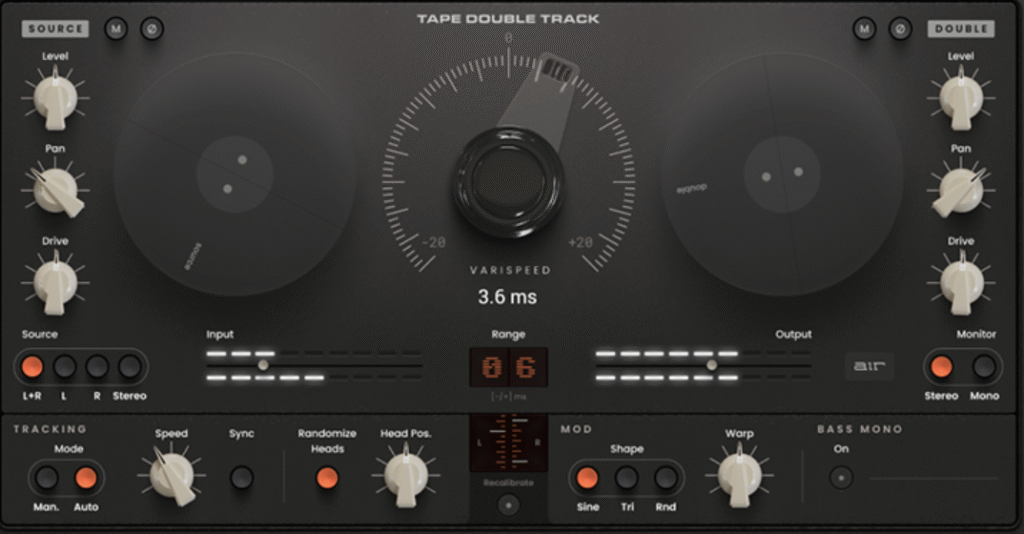
The first thing I noticed when opening the plugin was the clean and modern interface. It’s divided into three main pages:
- Double Tracking
- Channel Mix
- Autotracking
Routing options are simple, and you can choose between mono or stereo input/output — essential if you want to carefully shape the stereo image or avoid phase issues.
You can also choose between manual and automatic tracking modes. This gives you full control: either dial in the modulation yourself or let the plugin adapt to the incoming audio.
The Heart of It: The Oscillator
Just like the original ADT technique, this plugin recreates the effect by modulating tape speed.
The oscillator is the core of the sound — it defines how subtle or dramatic the modulation will be.
The Speed knob is always visible across all pages, which is smart, because it’s the parameter you’ll tweak the most while shaping the effect.
Channel Mix: Where the Tone Comes to Life
The Channel Mix page is probably where I spent most of my time.
Here you can adjust:
- levels
- panning
- stereo width
- drive (a very musical saturation)
The drive deserves a mention: it warms up the signal without muddying it. Perfect for vocals that need presence or synths that need a bit of character.
Putting It to the Test
Once I explored the interface, I started testing the plugin on different types of material.
On Vocals
This is where the plugin shines the most.
Flat vocals immediately gain width and dimension. Slow modulation settings give you a natural, almost “psychological” thickening effect. Push it harder and you get a more noticeable, phasy character that works well for R&B, trap, and modern pop vocals.
Just be careful: modulation speed matters.
Get it right and the plugin sounds beautiful. Get it wrong and it can feel unstable.
On Instruments & Drums
I also tested it on:
- electronic drums
- bass
- pianos
- pads and synths
And this is where the plugin surprised me.
On piano it adds subtle width, while on bass I noticed some phase issues — which is totally expected on low-end content. Luckily, there’s a phase invert button, which fixes those situations instantly.
Presets
The plugin includes several presets, and some of them are genuinely useful starting points — especially the ones tailored for lead vocals and backing vocals.
My Final Thoughts
I’ll be honest: in the past I haven’t always been impressed by Air Music Tech’s free plugins. Some felt a bit dated or uninspiring to me.
But this one is different.
⭐ Great sound quality
⭐ Clean, intuitive interface
⭐ Authentic ADT-style modulation
⭐ It’s completely free
If you work with vocals, synths, or if you enjoy experimenting with sound design, this plugin is absolutely worth downloading.
I’ve already added it to my “quick and useful” tools folder because it does exactly what it promises: it takes a flat track and makes it wider, more alive, and way more interesting.


LoFi Tape Saturator Plugin Win Mac VST3
The plugin works on all major DAWs like Ableton Live, FL Studio, and on Logic Pro if you’re using the Blue Cat Audio wrapper.
If not, no worries — the native AU version is on the way.
Where to Install a VST3 Plugin on macOS (Simple Guide)
To install your VST3 plugin on Mac, just follow this quick path:
Macintosh HD → Library → Audio → Plug-Ins → VST3
✔ Drag the .vst3 file into the VST3 folder
✔ Restart your DAW (Ableton, FL Studio, etc.)
✔ Done — your plugin should now appear in the plugin list
Enjoy the sound, experiment, and let this saturator take your beats to a new level. 🎛🔥