
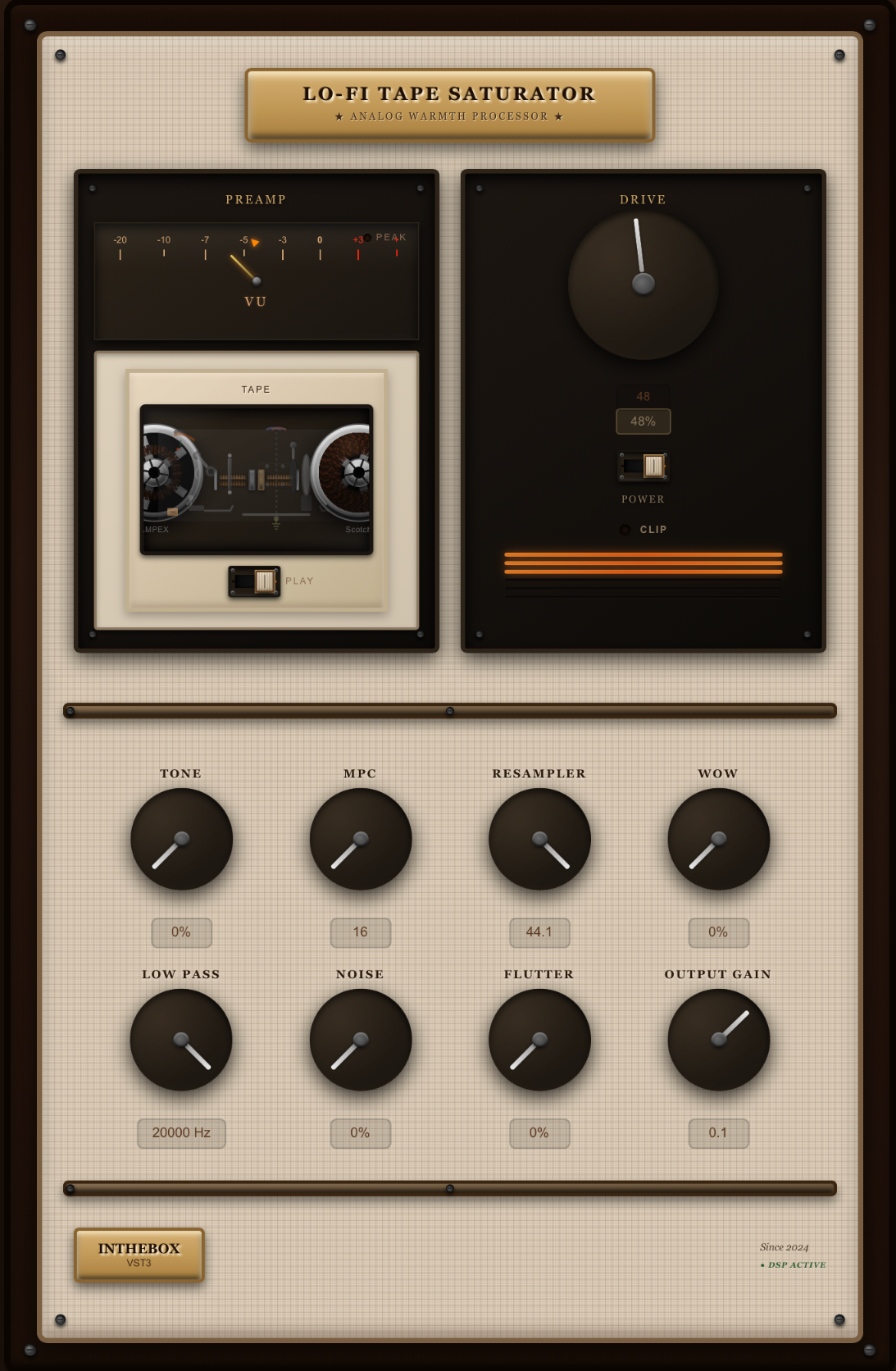
Description
1️⃣ POWER / BYPASS
Turns the plugin on or off.
• Off → clean dry sound
• On → all saturation and processing activated
2️⃣ DRIVE
The core of the plugin.
What it does:
• Adds input gain
• Introduces analog-style saturation
• Adds warm harmonics
• Makes the sound fatter and more compressed
• Naturally rolls off a bit of the high end (like real tape)
How to use it:
• Low values → gentle warmth
• High values → distorted, crushed, vintage tone
3️⃣ TONE
A simple 3-band EQ + tape-style compression.
• Low: adds/removes bass
• Mid: boosts presence
• High: brightens or darkens the sound
• More drive = more natural tape compression
4️⃣ MPC (BIT REDUCTION)
Simulates vintage sampler grit.
• 16-bit → clean
• 12-bit → classic MPC crunch
• 8-bit → dirty lo-fi
• 4-bit → extreme destruction
Lower bit depth =
more dirt, grain, compression, and aggressive character.
5️⃣ RESAMPLER (Aliasing / Sample Rate)
Changes the virtual sample rate.
• Lower values → downsampled, aliasing, digital dirt
• Higher values → thinner, airy sound
Perfect for glitch, electronic, and experimental textures.
6️⃣ WOW
Slow pitch modulation.
• Adds gentle tape wobble
• Nostalgic, warm, vintage feel
7️⃣ FLUTTER
Fast modulation.
• Simulates mechanical imperfections
• More noticeable and “vibrating” than WOW
8️⃣ HIGH CUT (LOW PASS)
Removes high frequencies.
• Low settings → dark and muffled
• High settings → bright and open
Recreates worn-out tape and lo-fi character.
9️⃣ NOISE
Adds vinyl-style ambience:
• Hiss
• Crackles
• Dusty record texture
Great for beats and sampled vibes.
🔟 CLIPPER
Controls how the signal is limited.
Modes:
• Hard → sharp, aggressive clipping
• Soft → smoother edges
• Tanh → analog-like soft curve
1️⃣1️⃣ OUTPUT GAIN
Adjusts the final volume of the plugin.
Use it to level-match after adding Drive or clipping.
1️⃣2️⃣ BYPASS CROSSFADE
Smooth transitions with no clicks or pops when bypassing.


Reviews
There are no reviews yet.